

Unlike HTTP proxies or HTTPS proxies, which are designed specifically for web traffic, a SOCKS proxy operates at the transport layer (Layer 5 of the OSI model). This means it doesn’t interpret or modify the data being sent—it simply forwards packets between the client and the destination. Because of this, SOCKS proxies can handle a wide range of protocols and applications, including web browsing, email (SMTP, IMAP, POP3), file transfers (FTP), peer-to-peer (P2P) traffic, and even VoIP.
The most commonly used version today is SOCKS5, which improves on earlier versions by supporting authentication, UDP traffic (important for real-time applications), and better security. SOCKS5 is often chosen when flexibility and compatibility across different traffic types are required.
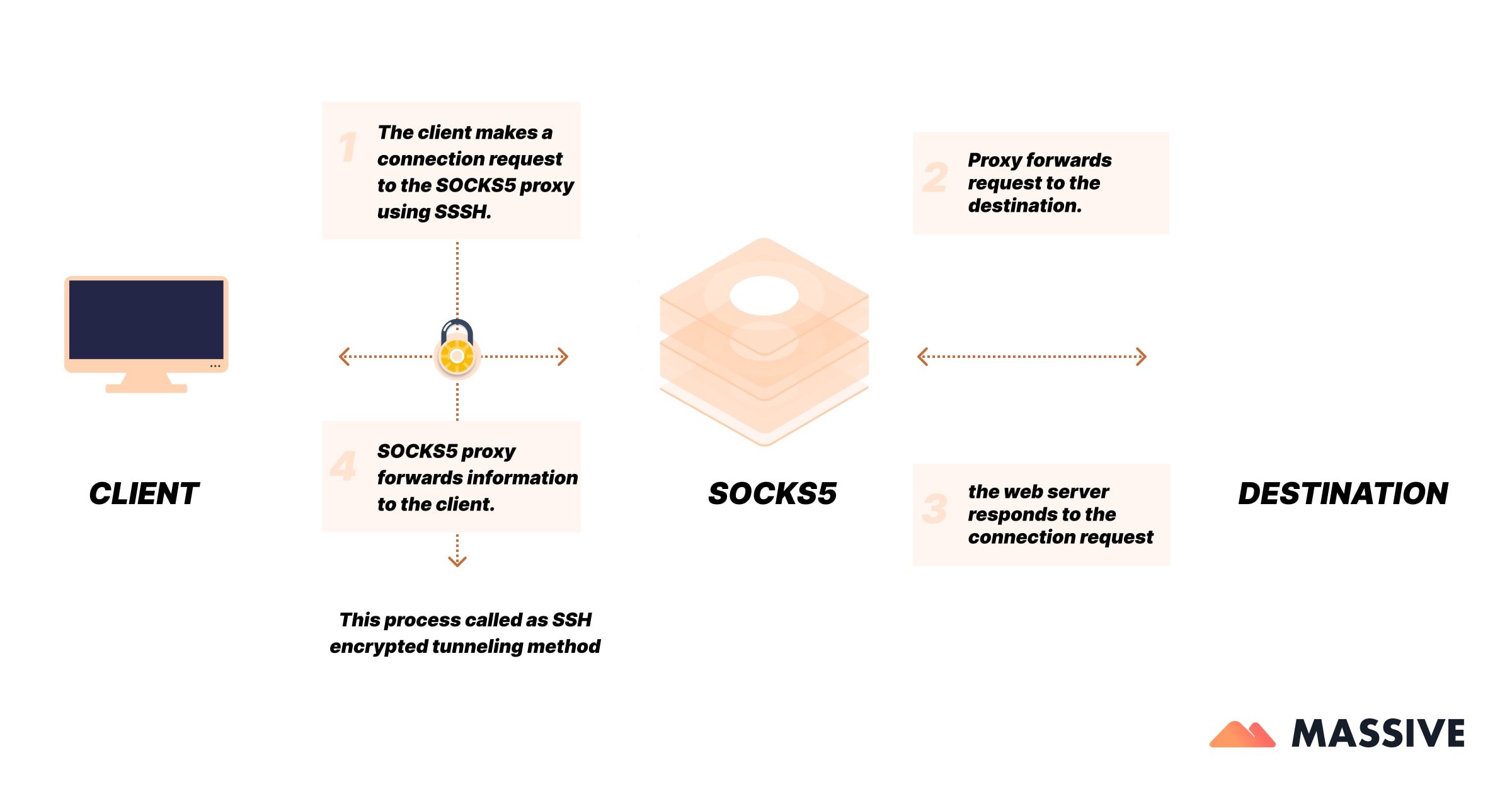
Types of SOCKS Proxies
- SOCKS4: The older version of the protocol, limited to TCP connections. It does not support authentication or UDP traffic, making it less secure and less versatile.
- SOCKS4a: An extension of SOCKS4 that allows the client to specify a domain name (instead of just an IP address). This makes it easier to use when DNS resolution on the client side isn’t possible.
- SOCKS5: The most advanced and widely used version. It supports both TCP and UDP traffic, includes authentication methods (for better security), and handles domain name resolution on the proxy side. SOCKS5 is the go-to choice for modern applications that require flexibility, speed, and compatibility.
Comparison Table: SOCKS4 vs SOCKS4a vs SOCKS5
<table class="GeneratedTable">
<thead>
<tr>
<th>Feature</th>
<th>SOCKS4</th>
<th>SOCKS4a</th>
<th>SOCKS5</th>
</tr>
</thead>
<tbody>
<tr>
<td>Supported Protocols</td>
<td>TCP only</td>
<td>TCP only</td>
<td>TCP and UDP</td>
</tr>
<tr>
<td>Authentication</td>
<td>No</td>
<td>No</td>
<td>Yes (username/password, etc.)</td>
</tr>
<tr>
<td>Domain Name Support</td>
<td>IP only</td>
<td>Yes (proxy resolves DNS)</td>
<td>Yes (proxy resolves DNS)</td>
</tr>
<tr>
<td>Security</td>
<td>Low</td>
<td>Low–Medium</td>
<td>High (authentication & flexibility)</td>
</tr>
<tr>
<td>Common Use Cases</td>
<td>Legacy apps</td>
<td>Legacy apps without DNS</td>
<td>Modern apps, P2P, VoIP, scraping</td>
</tr>
</tbody>
</table>
Common Challenges with SOCKS Proxies
How do I tunnel HTTP requests through a SOCKS proxy in Java?
Using only system properties, such as java.net.socks.username and java.net.socks.password, often fails because Java networking libraries may ignore them. The correct approach is to use an Authenticator that provides PasswordAuthentication. This way, HTTP requests can properly authenticate through SOCKS. Errors like SOCKS: Connection not allowed usually mean that the provider blocks HTTP traffic over SOCKS, or authentication is missing.
How do I use SOCKS in Java?
There are multiple ways:
- System Properties: Set values like socksProxyHost and socksProxyPort either in code or as JVM arguments.
- VM Arguments: Pass them when launching Java, e.g., java -DsocksProxyHost=127.0.0.1 -DsocksProxyPort=8080 App.
- Per-Connection Proxies: Use ProxySelector or HttpClient for fine-grained control and per-request proxying.
- Limitations: Some classes, like HttpURLConnection, may ignore SOCKS completely and only support HTTP proxies. In those cases, developers need alternative APIs or updated libraries.
How do I use SOCKS with SSL sockets?
When connecting to a remote server using SSL over SOCKS, the challenge is that the SSL socket expects an already-connected underlying socket. The solution is to create a raw Socket with a SOCKS proxy, connect it first, and then wrap it with SSLSocketFactory. Authentication for SOCKS5 may require combining this approach with an Authenticator.
¿Cuál es tu caso de uso?
Chatea con uno de nuestros fanáticos de los datos y desbloquea una prueba gratuita de 2 GB adaptada a tu proyecto.
Use Cases
Web Scraping and Data Collection
SOCKS5 proxies help developers route scraper traffic through rotating IPs while maintaining anonymity. They’re ideal for sites using multiple protocols, not just HTTP.
Torrenting and File Sharing
Because SOCKS5 supports both TCP and UDP, it can handle large file transfers and peer-to-peer connections efficiently without exposing your IP.
Secure Connections via HTTPS or SSL
Unlike HTTP proxies, SOCKS can carry encrypted HTTPS or SSL traffic directly, making it suitable for applications needing extra security.
SOCKS for Developers and Java Apps
Developers can configure SOCKS proxies in Java with System.setProperty() or ProxySelector. This setup is useful for bots, crawlers, or API clients that require fine-grained connection control.
Speed and Performance Optimization
SOCKS proxies transmit data without interpreting it, leading to lower latency. Choosing nearby proxy nodes ensures minimal delay—crucial for gaming, streaming, or automation.
Best Practices
Use SOCKS5 Whenever Possible
It supports authentication, UDP, and better performance compared to SOCKS4.
Combine SOCKS with Encryption
SOCKS proxies don’t encrypt data; use them in conjunction with HTTPS or a VPN for complete security.
Configure System-Wide or Per-App
In Java or Python, SOCKS can be set globally via environment variables or per-connection for flexibility.
Avoid Free SOCKS Proxy Servers
Unverified public servers often log data or expose IPs; use ethical providers with clear IP sourcing policies.
Monitor Latency and Proxy Rotation
Regularly test speed and uptime—searches for “fast socks proxy” and “socks proxy server” indicate that users care about performance and stability.
Conclusion
SOCKS proxies are flexible tools for routing almost any type of traffic, with SOCKS5 offering the most advanced features. They are especially valuable for tasks like P2P sharing, scraping, and gaming—but should be paired with encryption for security.
Ready to power up your data collection?
Sign up now and put our proxy network to work for you.
Frequently Asked Question
How do I tunnel HTTP requests through a SOCKS proxy in Java?
+
Use an Authenticator for credentials — system properties alone may not work.
How do I use a SOCKS proxy in Java?
+
Set socksProxyHost and socksProxyPort as system properties or JVM arguments, or configure per-connection proxies with ProxySelector/HttpClient.
How do I use SOCKS with SSL sockets?
+
First, create a raw Socket via SOCKS, then wrap it with SSLSocketFactory to enable secure connections.
